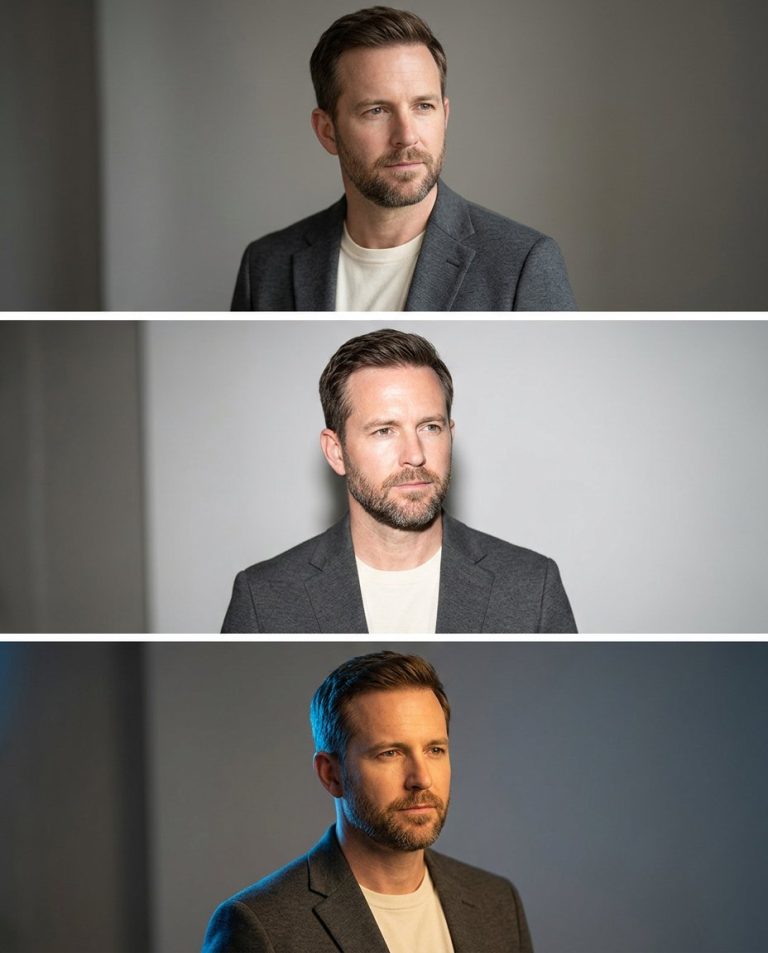
Window light is the gold standard for editorial portraits. This prompt applies a single motivated key light — a large window casting warm rectangular shadows across the background wall and subject’s shoulder. The light wraps naturally around the face with realistic falloff. Background is a clean interior wall showing depth. Optional lower copy band for Reel/publicity use. Customizable window shape, shadow intensity, and time-of-day color temperature.
Rights and accuracy note: Use a rights-cleared, licensed, public-domain or user-owned source photo. A recognizable public-figure photo may be used only as an optional visual example; do not imply endorsement, sponsorship, a new event or a statement the person never made. Add real names and copy outside the image, and label a materially AI-edited result. The featured sample is an original fictional portrait example and does not depict any real person.
What This Prompt Changes
- Applies a motivated window key light with visible frame edges in background
- Projects warm rectangular shadow bands across wall and subject’s shoulder
- Creates natural light wrap with realistic falloff and subtle rim separation
- Preserves skin pores and texture — no over-smoothing or artificial skin
- Optional lower copy band with subtle gradient for Reel/publicity use
How to Use It
Upload a well-lit portrait to ChatGPT (GPT Image). Paste Prompt 1 for classic window light (4:5), Prompt 2 for Venetian blind shadows (9:16), or Prompt 3 for sheer curtain diffusion (4:5). The AI applies motivated window light with projected shadows while preserving skin texture. Toggle the optional lower copy band by including or omitting ‘optional lower copy band’ in your request. Choose window style, shadow pattern, and aspect ratio per your need.
Customize the Result
- Window style: large rectangular (Prompt 1), Venetian blind slats (Prompt 2), sheer white curtain (Prompt 3)
- Shadow pattern: three rectangular bands, horizontal blind stripes, or soft curtain diffusion
- Color temperature: golden hour warm (4500K), late afternoon (4500K), morning cool-warm (5500K)
- Background depth: muted warm gray wall, textured plaster, minimalist bedroom
- Aspect ratio: 4:5 for feed, 9:16 for Reels
Related PromptTai guides:
- Create a Cinema-Grade Portrait With Practical-Light Depth From One Photo AI Prompt
- Create a Cinematic Light-Projection Portrait With Blank Copy Space AI Prompt
Copy the Main Prompt
Prompt 1
Prompt 2
Prompt 3
Negative Prompt (What to Avoid)
Note: These prompts work best with clear, well-lit source photos. The AI preserves your natural features while transforming the style, lighting, and mood. No text, numbers, or labels are rendered in the generated image — all copy is added manually for accuracy and compliance.
AI Photo Editing Prompt
Negative Prompt
Prompt Details
| Prompt Type | Photo Editing |
|---|---|
| AI Tool | ChatGPT |
| Style | Cinematic |
| Category | Photo Editing |
| Use Case | |
| Tags | Copy Space Portrait, Editorial Portrait Edit, Interior Editorial Portrait, Motivated Key Light, Projected Shadow Edit, Warm Window Light, Window Shadow Portrait |
| Aspect Ratio | 4:5 |
| Lighting | Window / Practical / Screen-Print / Acrylic / Device |
| Mood | Editorial / Cinematic / Graphic / Physical / Device |
| Difficulty | Intermediate |
How to Use This Prompt
- Copy the prompt using the button above.
- Open your preferred AI image-generation or editing tool.
- Upload the photo you want to edit.
- Paste the prompt into the text field.
- Adjust parameters (aspect ratio, quality, steps) if necessary.
- Generate or edit the image, then refine until you like the result.