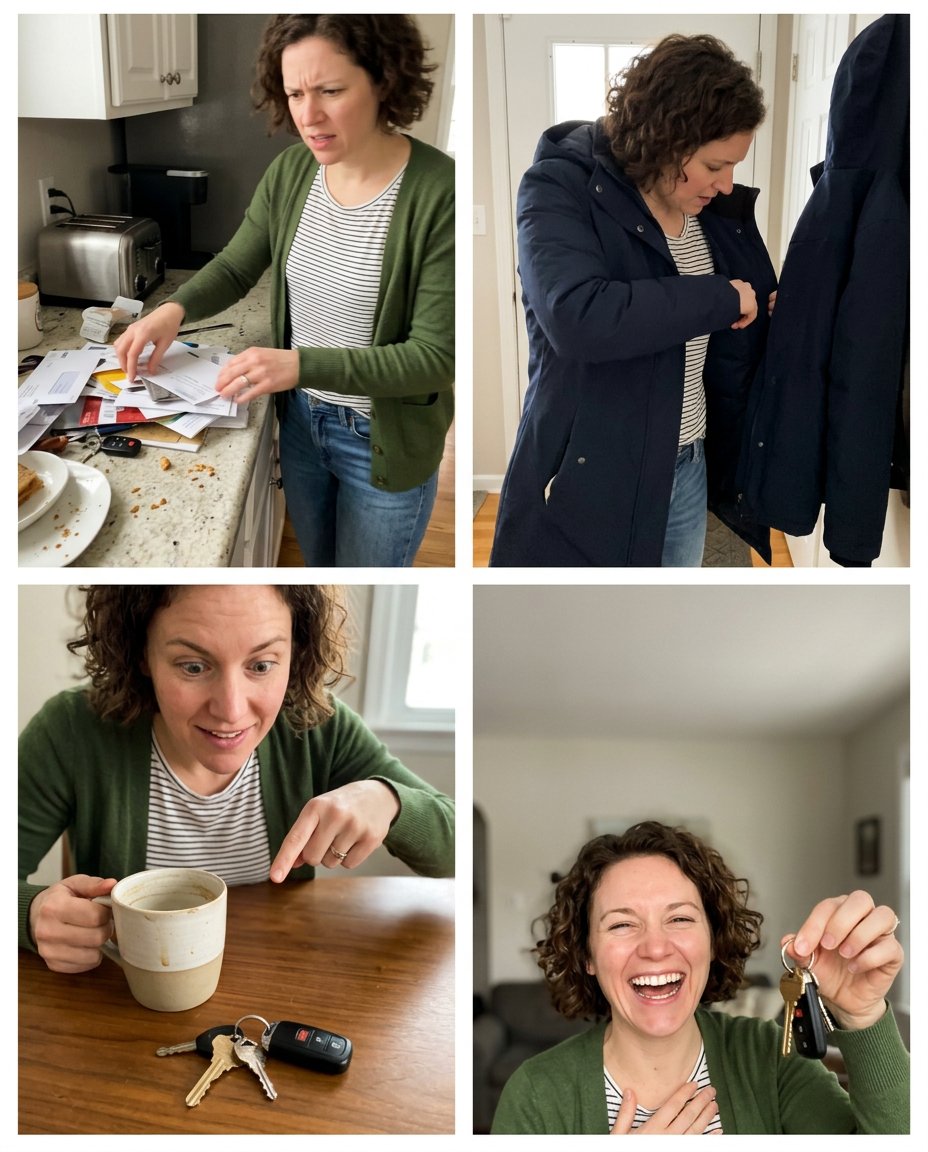
This prompt turns a selfie into a swipeable storytime format instead of a static portrait. It uses four visual beats—setup, search, discovery and reaction—while protecting identity and leaving the actual words to the creator’s caption or slide text.
What This Prompt Changes
- Creates four connected visual beats with a clear beginning and payoff
- Keeps one character’s face, outfit and proportions consistent
- Uses simple everyday action that can be understood without text
- Leaves space for the creator’s own captions and context
How to Use It
Upload a selfie and describe the short story in one sentence, such as “I thought I lost my keys, then found them beside my coffee.” Ask for four panels and add the exact narration later in Instagram or Snapchat.
Customize the Result
- Choose a funny discovery, small misunderstanding, travel moment, cooking story or work anecdote
- Use four, five or six panels with a clear visual reveal near the end
- Choose candid phone photography, clean illustration or soft editorial realism
AI Photo Editing Prompt
PromptUse the uploaded selfie as the exact identity reference for the same adult and turn it into a four-panel visual storytime carousel. Tell this silent everyday story through action only: panel one shows the person searching a messy kitchen for their keys, panel two shows them checking a coat pocket by the door, panel three reveals the keys sitting beside a coffee mug on a table, and panel four shows the person laughing with relief while holding the keys. Preserve the same face, hairstyle, casual outfit, age and body proportions in every panel. Make the sequence easy to understand without text through clear poses, props and camera progression. Use candid phone-photo realism, simple white spacing and a clean blank area for captions. Render no words, speech bubbles, logo, watermark or fake lettering; the creator will add the real story later. Vertical 4:5 Instagram carousel. Midjourney / Flux.1 alternative: [SELFIE_IMAGE] four-panel visual storytime carousel, same person searching for keys, checking coat pocket, finding keys beside coffee mug, laughing with relief, consistent identity and outfit, clear sequential action, blank caption space, no text --ar 4:5 --style raw --iw 2.0
Negative Prompt
Negative Promptdifferent person between panels, confusing action, changed outfit, extra keys, unreadable text, speech bubbles, logo, watermark, impossible hands, unrelated locations, fantasy story
Prompt Details
| Prompt Type | Photo Editing |
|---|---|
| AI Tool | Gemini |
| Style | Photorealistic |
| Category | Photo Editing |
| Use Case | Instagram, Social Media |
| Tags | carousel narrative, four panel story, social carousel, storytime carousel, swipe story, visual story |
| Aspect Ratio | 4:5 |
| Lighting | Natural home light |
| Camera | Storytime phone camera |
| Lens | 35mm mixed framing |
| Mood | Warm, narrative |
| Difficulty | Intermediate |
How to Use This Prompt
- Copy the prompt using the button above.
- Open your preferred AI image-generation or editing tool.
- Upload the photo you want to edit.
- Paste the prompt into the text field.
- Adjust parameters (aspect ratio, quality, steps) if necessary.
- Generate or edit the image, then refine until you like the result.