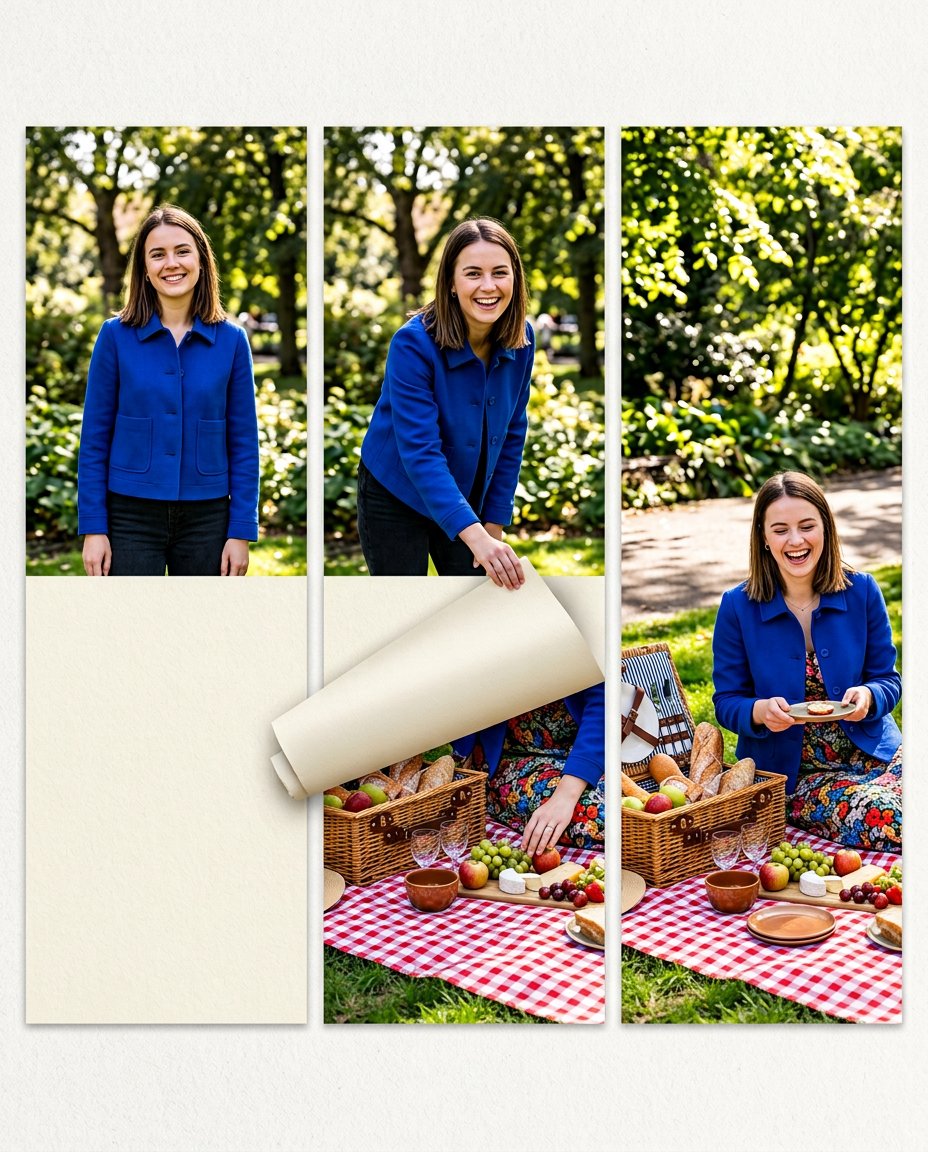
This prompt turns one ordinary photo into an interactive tap-to-reveal carousel. A paper-like cover hides the payoff at first, then peels back across the next panels to show the full scene. The creator can add the actual tap, sticker or reveal instruction in Instagram after generation, while the visual stays clean and text-free.
What This Prompt Changes
- Creates a three-panel covered, partly revealed and fully revealed story
- Preserves the same person, outfit, lighting and recognizable visual details
- Uses a tactile flap or mask that makes the hidden area obvious without generated text
- Builds curiosity around one visual payoff rather than comparing unrelated options
How to Use It
Upload a portrait or source photo and choose what should be hidden at first: a picnic basket, finished outfit, destination, product result or makeover detail. Add the tap-to-reveal wording, sticker and music inside Instagram after generation.
Customize the Result
- Use paper, a sticker, a curtain, a frosted panel, a folded map or a screenshot-like block as the cover
- Reveal a finished meal, outfit detail, travel view, desk transformation, product result or surprise prop
- Keep the hidden area large enough to understand on a phone but small enough to create genuine curiosity
AI Photo Editing Prompt
PromptUse the uploaded portrait as the exact reference for the same adult woman's identity, face, hairstyle, skin tone, cobalt-blue jacket and natural expression. Create a clean three-panel vertical 4:5 tap-to-reveal carousel design with narrow gutters. Panel one shows the woman smiling in a sunny city park while a large opaque cream paper flap covers the lower half of the image. Panel two shows the same flap partly peeled upward, revealing a colorful picnic basket, checked blanket and the edge of a bright outfit detail. Panel three reveals the full picnic scene and the woman's delighted expression. Make the paper flap and peel edge tactile and believable, with soft shadows and no symbols or fake interface. Keep identity, color grade and setting coherent across all panels. Render no words, letters, numbers, labels, emoji, logo, app interface or watermark; the creator will add the tap or reveal instruction later. Photorealistic interactive reveal carousel, vertical 4:5 per panel. Midjourney / Flux.1 alternative: [PORTRAIT_IMAGE] three-panel tap-to-reveal carousel, opaque cream paper flap, partly peeled picnic reveal, full picnic payoff, same person and cobalt jacket, no text --ar 4:5 --style raw --iw 2.0
Negative Prompt
Negative Promptflat unrelated collage, changed identity, fake sticker text, app UI, icons, logo, watermark, broken paper edges, excessive clutter, distorted hands, different lighting, celebrity likeness
Prompt Details
| Prompt Type | Photo Editing |
|---|---|
| AI Tool | ChatGPT |
| Style | Minimalist |
| Category | Photo Editing |
| Use Case | Instagram, Social Media |
| Tags | hidden detail, interactive reveal, peel reveal, reveal carousel, swipe reveal, tap to reveal |
| Aspect Ratio | 4:5 |
| Lighting | Bright natural park daylight |
| Camera | Interactive creator phone camera |
| Lens | 35mm phone main camera |
| Mood | Curious, playful |
| Difficulty | Intermediate |
How to Use This Prompt
- Copy the prompt using the button above.
- Open your preferred AI image-generation or editing tool.
- Upload the photo you want to edit.
- Paste the prompt into the text field.
- Adjust parameters (aspect ratio, quality, steps) if necessary.
- Generate or edit the image, then refine until you like the result.