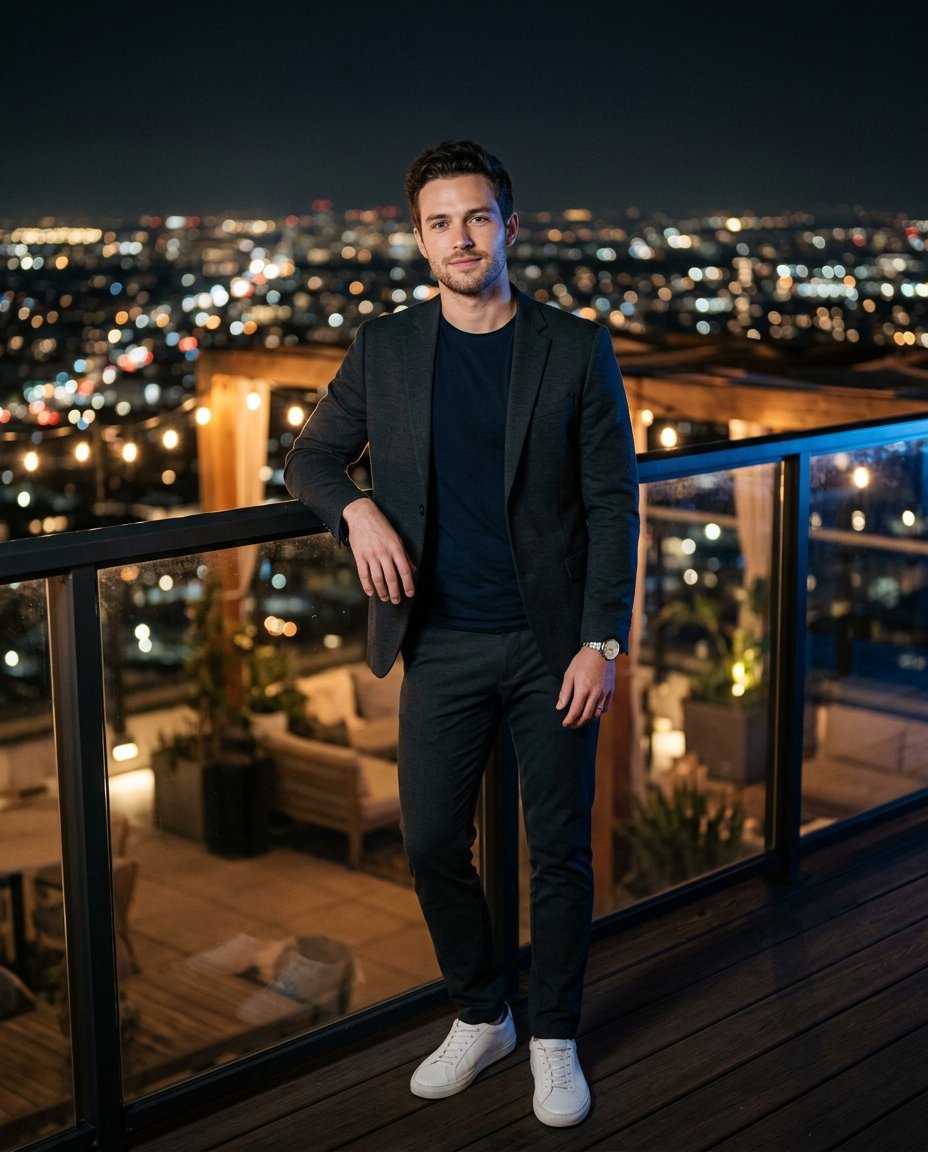
This photo editing prompt turns a casual photo into a luxury rooftop night photoshoot. It adds a city skyline, evening wear and cinematic night lighting while keeping the person’s face, hairstyle and identity exactly the same. Perfect for a premium Instagram profile or a stylish feed post.
What This Prompt Changes
- Replaces the background with a glowing city skyline rooftop
- Swaps the outfit for smart casual evening wear
- Adds cinematic night lighting with warm bokeh and a blue-hour rim light
- Keeps the face, hairstyle, skin tone and identity exactly the same
Best Photo for This Prompt
Use a sharp, well-lit photo with the face clearly visible and a simple background that is easy to replace. Standing or waist-up poses work best. Avoid busy backgrounds and harsh flash, which make the new scene harder to blend.
Customize the Result
- Change the setting: poolside rooftop, balcony, or penthouse terrace
- Change the outfit: casual tee, blazer or full evening suit
- Change the mood: neon skyline, soft dusk, or black-and-white night
- Change the format: 9:16 for Stories or 1:1 for the profile grid
AI Photo Editing Prompt
PromptUse the uploaded photo as the exact face and identity reference. Keep the person's facial structure, skin tone, hairstyle, facial features and body proportions 100 percent unchanged — do not beautify, reshape or alter the face. Transform the photo into a luxury rooftop night photoshoot. Place him on a stylish rooftop terrace at night with a glowing city skyline behind him. Dress him in smart casual evening wear — a dark tailored jacket over a fitted tee, slim trousers and minimal sneakers. Pose: relaxed and confident, leaning lightly on the terrace railing, looking toward the camera with a calm expression. Lighting: cinematic night lighting with warm string lights in the background, a soft key light on the face and a subtle blue-hour rim light. Camera: vertical 4:5 Instagram framing, 85mm lens look, shallow depth of field with bokeh city lights and sharp focus on the face. Keep realistic skin texture, natural shadows and a photorealistic finish. The result should look like a premium rooftop editorial of the same person.
Negative Prompt
Negative Promptchanged face, different person, distorted body, bad anatomy, blurry face, cartoonish, anime, watermark, text, unrealistic lighting, oversmoothed skin
Prompt Details
| Prompt Type | Photo Editing |
|---|---|
| AI Tool | Gemini |
| Style | Photorealistic |
| Category | Photo Editing |
| Use Case | Instagram, Social Media |
| Tags | cinematic, identity preservation, instagram, male portrait, night scene, photo editing, portrait, rooftop |
| Aspect Ratio | 4:5 |
| Lighting | Night city lights |
| Camera | DSLR |
| Lens | 85mm |
| Mood | Confident |
| Difficulty | Beginner |
How to Use This Prompt
- Copy the prompt using the button above.
- Open your preferred AI image-generation or editing tool.
- Upload the photo you want to edit.
- Paste the prompt into the text field.
- Adjust parameters (aspect ratio, quality, steps) if necessary.
- Generate or edit the image, then refine until you like the result.