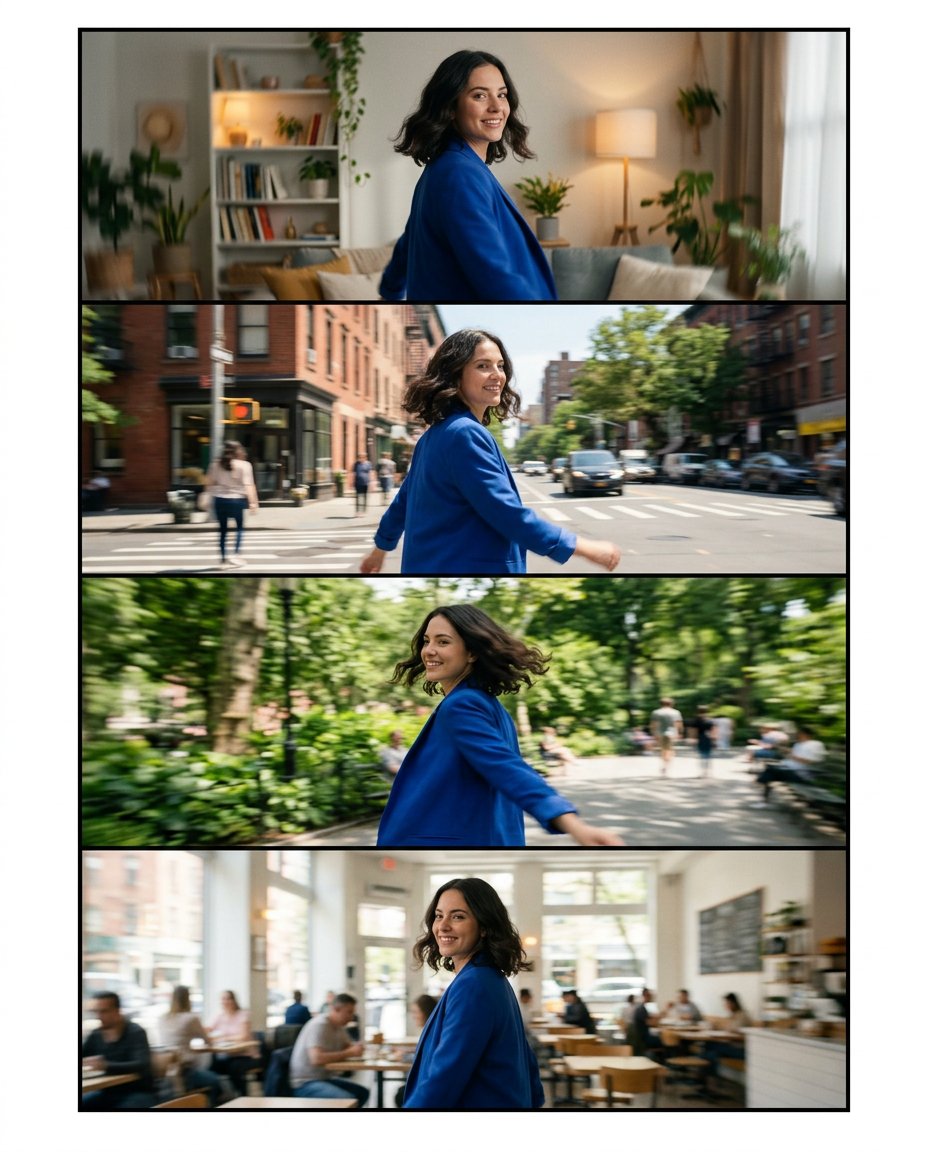
This prompt creates a spin-transition storyboard from one portrait. It keeps the same face, jacket and camera height while the subject rotates through four locations, giving a creator aligned still frames to cut into a smooth left-to-right transition in Instagram Edits or another editor.
What This Prompt Changes
- Builds four connected frames around one consistent quarter-turn movement
- Preserves the same face, hairstyle, jacket, body proportions and direction of travel
- Changes the setting while keeping camera height, subject scale and movement readable
- Adds restrained edge motion blur without turning the result into a distorted action photo
How to Use It
Upload a portrait where the subject’s shoulders and upper body are visible. Choose four settings or outfit moments, then ask for the same left-to-right spin in every frame. Export the panels separately and use the matching movement as the transition anchor in your editor.
Customize the Result
- Move through a room, street, park and café, or use four outfit changes in one location
- Use a slow elegant turn, energetic creator spin or gentle handheld phone movement
- Keep the background simple if the subject’s jacket, hair or prop should remain the transition focus
AI Photo Editing Prompt
PromptUse the uploaded portrait as the exact identity, face, hairstyle, skin tone, body proportions and cobalt-blue jacket reference for the same adult. Create a clean four-frame vertical 4:5 spin-transition storyboard contact sheet. The subject turns in the same left-to-right direction through four connected quarter-turn moments: a cozy living room, a bright city street, a green park and a neighborhood café. Match camera height, focal length, subject scale, horizon level and movement direction in every frame. Keep the face recognizable and the jacket consistent while allowing the background to change. Add subtle natural motion blur only at the outer hair, hands and background edges; keep the face sharp in each frame. Use narrow gutters, bright daylight and realistic creator-phone footage. Render no words, letters, numbers, transition arrows, logos, app interface or watermark. Photorealistic edit-ready storyboard, vertical 4:5. Midjourney / Flux.1 alternative: [PORTRAIT_IMAGE] four-frame spin-transition storyboard, same person in cobalt jacket, left-to-right quarter-turn, room, city street, park and café, consistent camera height and subtle motion blur, no text --ar 4:5 --style raw --iw 2.0
Negative Prompt
Negative Promptdifferent face, inconsistent jacket, mirrored movement, frozen duplicate pose, excessive blur, warped hands, random camera angles, text, arrows, logo, watermark, app interface, unrelated collage
Prompt Details
| Prompt Type | Photo Editing |
|---|---|
| AI Tool | ChatGPT |
| Style | Photorealistic |
| Category | Photo Editing |
| Use Case | Instagram, Social Media |
| Tags | camera spin, creator edit, motion blur, spin transition, storyboard carousel, transition storyboard |
| Aspect Ratio | 4:5 |
| Lighting | Bright natural daylight across locations |
| Camera | Handheld creator phone camera |
| Lens | 26mm phone wide lens |
| Mood | Energetic, smooth |
| Difficulty | Intermediate |
How to Use This Prompt
- Copy the prompt using the button above.
- Open your preferred AI image-generation or editing tool.
- Upload the photo you want to edit.
- Paste the prompt into the text field.
- Adjust parameters (aspect ratio, quality, steps) if necessary.
- Generate or edit the image, then refine until you like the result.