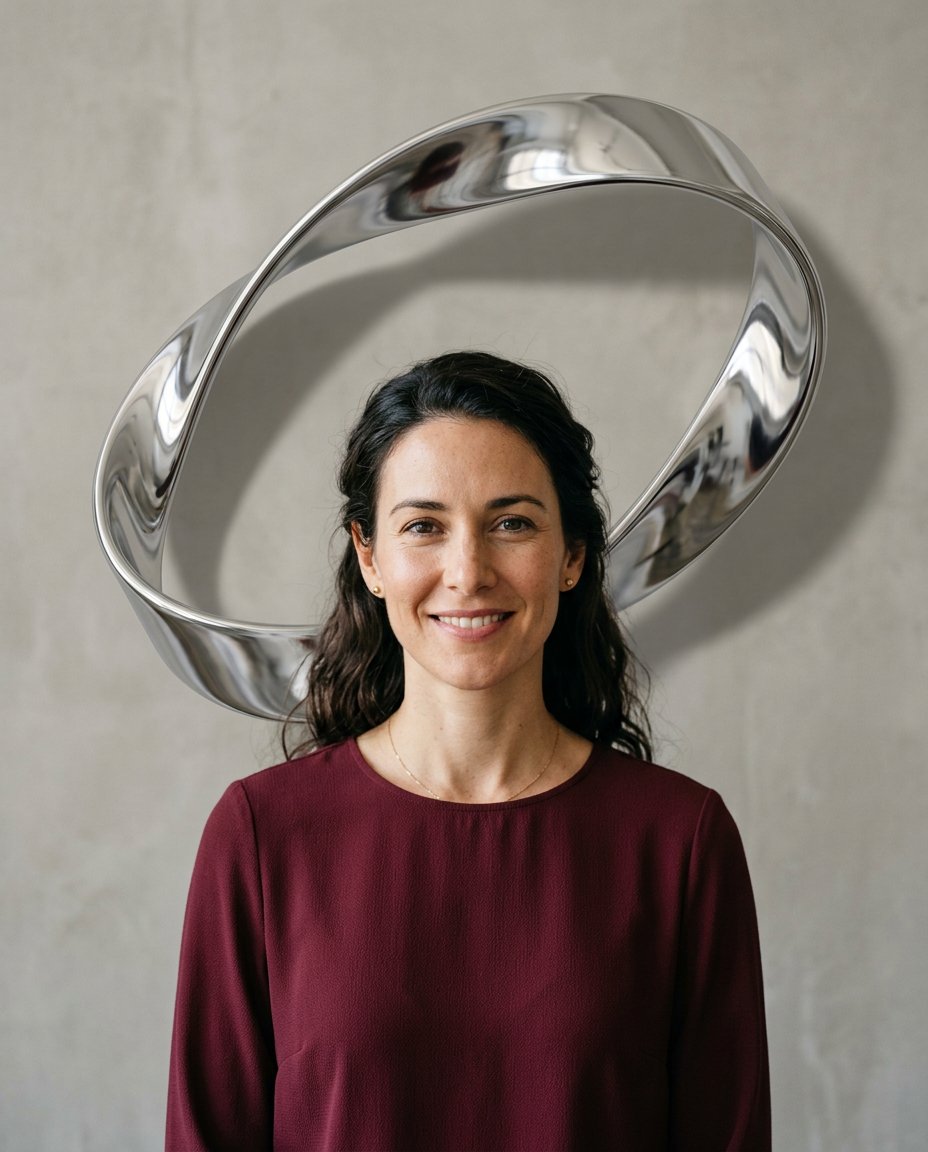
One memorable sculptural object can give a feed portrait a premium visual signature without turning it into a poster. This prompt places a single reflective chrome ribbon behind an adult woman and keeps the image open enough for a caption added outside the generated image.
Rights and accuracy note: Use a rights-cleared, licensed, public-domain or user-owned source photo. Each featured sample is an original fictional portrait example and does not depict a real public figure or documentary event. Add real names and copy outside the generated image, and label a materially AI-edited result when appropriate.
What This Prompt Changes
- Preserves the woman’s identity, face, hair, expression, clothing and skin texture
- Adds one large continuous chrome ribbon loop behind the subject
- Creates realistic silver reflections and a soft cast shadow on the studio wall
- Keeps the sculpture separate from the body and face
- Leaves a clean side margin and lower area for manual copy
How to Use It
Upload an authorized adult woman selfie or portrait with the upper body visible. Use the prompt to add the single chrome sculpture and match its reflections to the studio light. Add any verified caption or product context manually after generation.
Customize the Result
- Use polished silver, dark chrome, rose gold or brushed aluminum
- Make the ribbon loop vertical, diagonal or asymmetrically offset
- Use a warm gray, cream or charcoal studio wall
- Keep one sculpture only so the portrait remains thumbnail-readable
AI Photo Editing Prompt
Negative Prompt
Prompt Details
| Prompt Type | Photo Editing |
|---|---|
| AI Tool | ChatGPT |
| Style | Photorealistic |
| Category | Photo Editing |
| Use Case | Girls, Instagram, Social Media |
| Tags | chrome ribbon portrait, chrome sculpture backdrop, Editorial Portrait Edit, Female Selfie Edit, instagram portrait edit, Social Media Portrait |
| Aspect Ratio | 4:5 |
| Lighting | Soft neutral studio light with controlled silver reflections |
| Camera | Centered editorial portrait camera |
| Lens | 50mm |
| Mood | Minimal and premium |
| Difficulty | Intermediate |
How to Use This Prompt
- Copy the prompt using the button above.
- Open your preferred AI image-generation or editing tool.
- Upload the photo you want to edit.
- Paste the prompt into the text field.
- Adjust parameters (aspect ratio, quality, steps) if necessary.
- Generate or edit the image, then refine until you like the result.