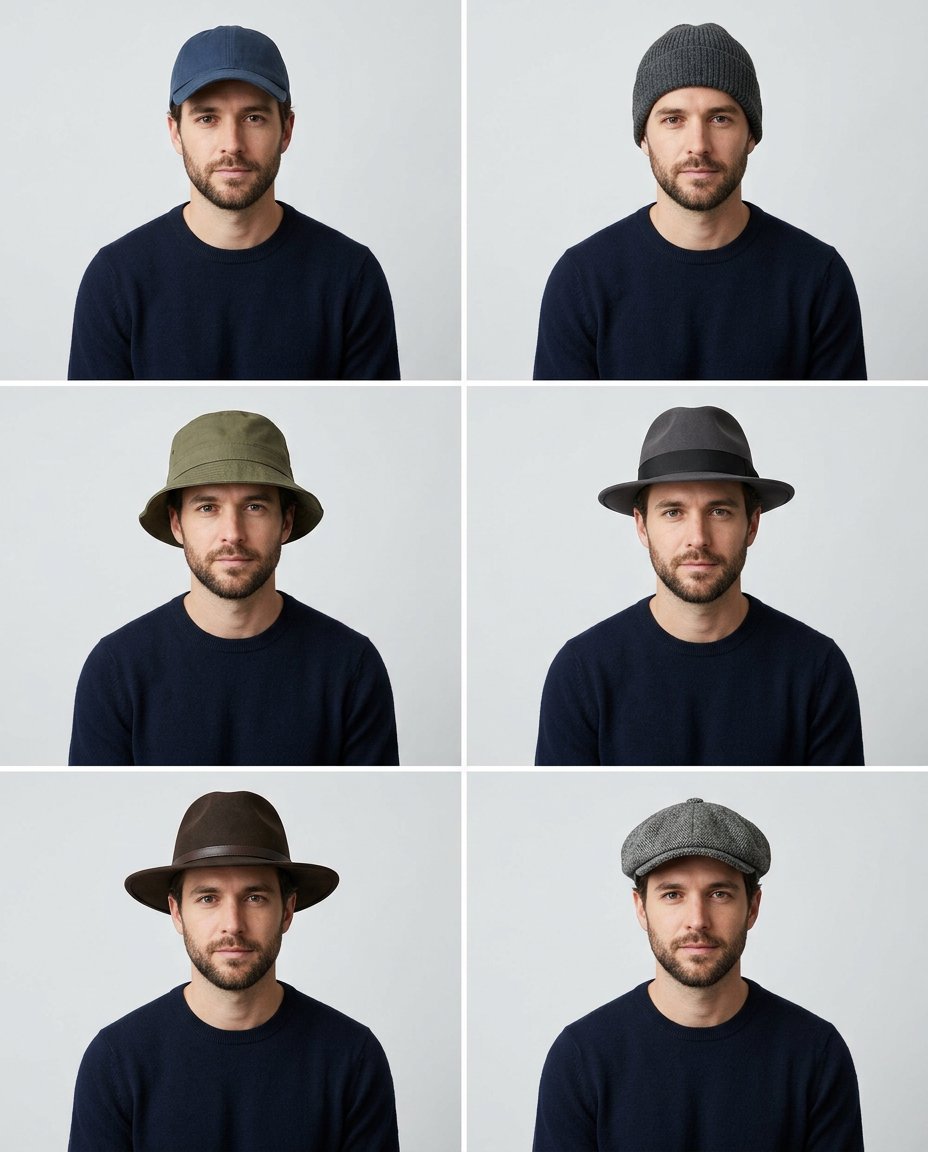
This prompt creates a shareable headwear try-on grid from one portrait. It keeps the same face, hair, outfit and camera setup in every cell, then changes only the hat so users can compare a baseball cap, beanie, bucket hat, fedora, wide-brim hat and flat cap.
What This Prompt Changes
- Shows six hat silhouettes in one 2-by-3 comparison grid
- Preserves face, hairstyle, outfit, pose and neutral background
- Fits each hat naturally around the hair, forehead and ears
- Leaves out brand marks and labels for clean social polling
How to Use It
Upload a front-facing or lightly turned portrait to Gemini or ChatGPT. Keep the top of the hair and shoulders visible. Add the option names later as an Instagram Story poll or carousel caption.
Customize the Result
- Preview beanies, caps, bucket hats, fedoras, flat caps, berets or wide-brim hats
- Choose neutral, streetwear, vintage or summer color palettes
- Use a clean studio grid, mirror-selfie layout or outdoor lifestyle background
AI Photo Editing Prompt
PromptUse the uploaded portrait as the exact face, hairstyle, skin tone, outfit, expression, pose and camera reference for the same adult. Create a clean 2-by-3 comparison grid with identical framing, neutral background and even soft light in every cell. Change only the headwear: navy baseball cap, charcoal knitted beanie, olive bucket hat, black fedora, brown wide-brim felt hat and gray flat cap. Fit every hat naturally to the head and hair with believable shadows, contact points and scale. Preserve the face shape, eyes, nose, mouth, hairline, ears and body proportions in every option. Do not add logos, brand marks, labels, words or watermark. Keep the grid simple and readable at phone size so the creator can add poll choices later. Photorealistic accessory try-on, vertical 4:5. Midjourney / Flux.1 alternative: [PORTRAIT_IMAGE] six-cell hat-style comparison grid of the same exact person, baseball cap, beanie, bucket hat, fedora, wide-brim hat and flat cap, accurate fit and hair interaction, neutral studio, no logos or text --ar 4:5 --style raw --iw 2.0
Negative Prompt
Negative Promptdifferent face, changed hair, floating hat, oversized hat, hidden eyes, brand logo, text, watermark, extra person, inconsistent outfit, warped ears, cartoon style
Prompt Details
| Prompt Type | Photo Editing |
|---|---|
| AI Tool | Gemini |
| Style | Photorealistic |
| Category | Photo Editing |
| Use Case | Instagram, Social Media |
| Tags | accessory grid, cap styles, hat styles, hat try on, headwear grid, virtual try on |
| Aspect Ratio | 4:5 |
| Lighting | Even soft studio light |
| Camera | Accessory try-on camera |
| Lens | 85mm portrait |
| Mood | Practical, stylish |
| Difficulty | Beginner |
How to Use This Prompt
- Copy the prompt using the button above.
- Open your preferred AI image-generation or editing tool.
- Upload the photo you want to edit.
- Paste the prompt into the text field.
- Adjust parameters (aspect ratio, quality, steps) if necessary.
- Generate or edit the image, then refine until you like the result.