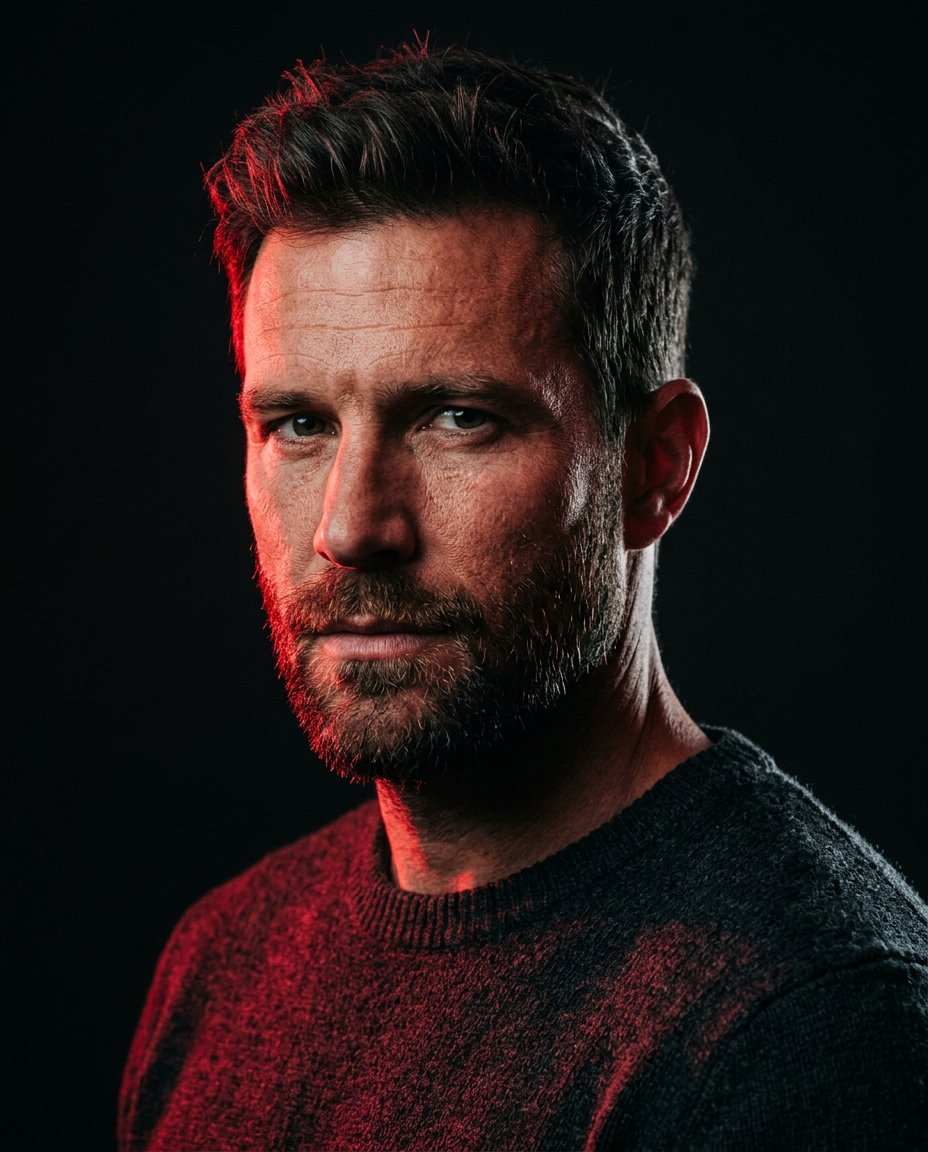
This prompt focuses the current red-aesthetic direction into a repeatable lighting edit instead of a generic red filter. It creates a saturated crimson key light, preserves realistic skin and hair detail, and keeps one cool shadow edge so the portrait has depth in an Instagram post or Snapchat Story.
What This Prompt Changes
- Rebuilds the key light as saturated crimson-red light from one side
- Keeps a narrow cool shadow edge for facial depth and separation
- Preserves natural skin pores, eyes, hair and clothing texture
- Uses a simple dark background so the red color reads immediately in a feed
How to Use It
Upload a clear solo portrait to ChatGPT or Gemini. Ask for split lighting rather than a red overlay. A dark or uncluttered original background produces the cleanest social result; review skin tones to prevent an artificial plastic finish.
Customize the Result
- Choose deep wine red, pure scarlet, ruby or hot vermilion light
- Set the shadow edge to cool blue, neutral charcoal or almost black
- Request close-up, chest-up or mirror-selfie framing while keeping the face unchanged
AI Photo Editing Prompt
PromptEdit the uploaded portrait into a current red-aesthetic social portrait with precise split lighting. Preserve the exact facial identity, face shape, eye color and spacing, nose, mouth, hairstyle, expression, skin texture, body proportions and clothing. Illuminate the subject from the left with saturated crimson-red light that shapes the cheek, jaw, hair and knit or fabric texture; keep a narrow cool charcoal-blue edge on the opposite side so the face has depth instead of becoming a flat red wash. Use a deep near-black background with only subtle atmospheric falloff, realistic shadow direction and natural catchlights. Keep the eyes sharp, skin pores visible and red color rich but not neon-plastic or oversaturated. The result should feel like an intentional Instagram post or Snapchat Story portrait, not a direct-flash night scene, beauty filter or generic color grade. No text, logo, watermark or extra people. Vertical 4:5. Midjourney / Flux.1 alternative: [IMAGE_URL] crimson split-light social portrait of the same person, exact identity preserved, saturated red key light from the left, narrow cool shadow edge on the right, natural skin pores, sharp eyes, deep black background, high-contrast red aesthetic editorial photography --ar 4:5 --style raw --iw 2.0
Negative Prompt
Negative Promptflat red overlay, plastic skin, changed face, red eyes, blown highlights, invisible shadow edge, full color rainbow lighting, extra people, text, logo, watermark, beauty filter, excessive HDR
Prompt Details
| Prompt Type | Photo Editing |
|---|---|
| AI Tool | ChatGPT |
| Style | Cinematic |
| Category | Photo Editing |
| Use Case | Instagram, Social Media |
| Tags | crimson lighting, dramatic portrait, red aesthetic, red glow, social portrait, split lighting |
| Aspect Ratio | 4:5 |
| Lighting | Crimson split light |
| Camera | Social editorial camera |
| Lens | 85mm |
| Mood | Bold, magnetic |
| Difficulty | Beginner |
How to Use This Prompt
- Copy the prompt using the button above.
- Open your preferred AI image-generation or editing tool.
- Upload the photo you want to edit.
- Paste the prompt into the text field.
- Adjust parameters (aspect ratio, quality, steps) if necessary.
- Generate or edit the image, then refine until you like the result.